Tuesday, November 12, 2019
FXXTokenMaster.com is UP
My site is now up, at least for the moment. My host drop the ball big time and all files were replaced with a very old version. I just can't wait any longer and blasted the entire site with files that I know are working.

Sunday, November 3, 2019
Launcher PRO 3.6.0
Launcher PRO 3.6.0 Build 288 is now available.
Change Log
====================
3.6.0 Build 288
- Added: Support for 3.34 64bit Only
- Improved PSdZ Handling and Translation
- Minor bug fixes
*Requires Google Authenticator mobile app. Download from Apple App Store or Google Play Store
- Added: Support for 3.34 64bit Only
- Improved PSdZ Handling and Translation
- Minor bug fixes
Note: Please see https://www.fxxtokenmaster.com and blog before upgrading to 3.1+. Launcher PRO now uses Time-based One-time Password for authentication.
Google Authenticator is required when using dynamic activation and when updating the Launcher.
V3.34 is really interesting, but appears to be an indication of how things are, going forward. The easier way to deal with it would have been to provide an alternate REST API for signing and encrypting NCD, but I don't believe in encrypting user's data. It's my NCD, I'd like to not be locked out of it, so I chose the harder way. NCD files remain not encrypted. Properly signed, but not encrypted.
It appears to be well-coded and stable. I like this version a lot.
**Don't use the comment section to ask where to get it and stop posting your email addresses
Tuesday, August 27, 2019
X3!!!
I've been playing with a friend's G01 XDrive these couple of days, (well, it's been more than a week, but who's counting?). No serious coding yet, just taking a look-see at what can be done with it.
G01 is really nice. It's small enough to replace a sedan, but not big enough to compete with a family SUV. I like it, so much so, that it gave me enough motivation to go and shop around, and shop around I did. I've looked and test drove a couple of G20s. I like the G20, so much technology squeezed into that little car. However, I'm still more impressed with the G01, even with its older technology. I know it will have the Live Cockpit Pro and ID7 in the coming builds, so G01 will have all the same bells and whistles that the G20 has.
Did I say I like the G01? YES, I like it. I like it so much that a new G01 will be coming home with me soon :( Just deciding between BSM, Alpine White, Mineral White. Leaning towards BSM, like my F30. I wish I can turn off XDrive. I mean, in my suburban settings, I hardly have the need for it but I want it, in case I need it.
I can hear a voice screaming inside my head: "Ahhhh, noooooo, wait for a couple of months and you'll have all the good stuff the G20 has!!!!!". F*ck my EQ, I wanna drive it NOW!!! Giving up the i3 for it. I think I'm OK with that trade. That thing depreciates like crazy, though.
I detailed my F30 last weekend, to help me contain my excitement. She still runs like a champ, and she aged gracefully. After getting in a G20 though, it does feel really old.
And you know what else it motivated me to do? Dusted off NCD/CAFD Tool. The tool is so outdated that I see a lot of inaccuracies, and the "What-If"s functions are really crawling. Of course, the format of NCD and CAF files have changed a little bit too, and so are the rules for functions.
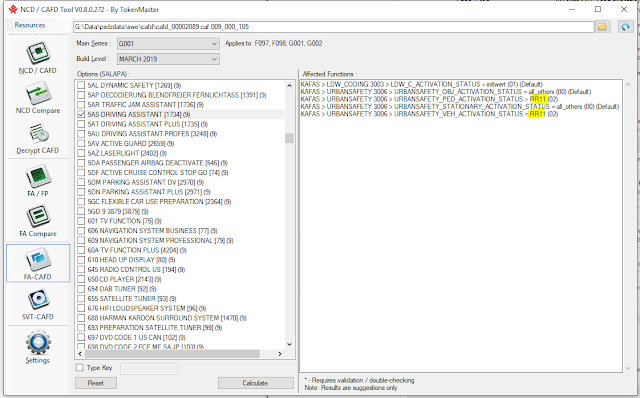
I just want to quickly bring it back to life, so I plugged in the components from Launcher PRO. It has so much dependencies on it, but it gave me the benefit of quickly analyzing the G-series stuff. So far, so good. I can see some minor issue with mapping though, but that's just given, the way we do things.
I can't wait to fully analyze the CAFs on this G01. Hopefully, I can enable and test some stuff soon, in preparation for my own car.
My friend has been asking what we can possibly change with his car, but hasn't asked for it back. I might keep it for another week or so. NO! I WILL keep it for another week or so 😂
UPDATE: 09/07/2019
There seem to be a lot of potential, but I just don't have enough time to test them. So far, here's what I did to this X3:
G01 is really nice. It's small enough to replace a sedan, but not big enough to compete with a family SUV. I like it, so much so, that it gave me enough motivation to go and shop around, and shop around I did. I've looked and test drove a couple of G20s. I like the G20, so much technology squeezed into that little car. However, I'm still more impressed with the G01, even with its older technology. I know it will have the Live Cockpit Pro and ID7 in the coming builds, so G01 will have all the same bells and whistles that the G20 has.
Did I say I like the G01? YES, I like it. I like it so much that a new G01 will be coming home with me soon :( Just deciding between BSM, Alpine White, Mineral White. Leaning towards BSM, like my F30. I wish I can turn off XDrive. I mean, in my suburban settings, I hardly have the need for it but I want it, in case I need it.
I can hear a voice screaming inside my head: "Ahhhh, noooooo, wait for a couple of months and you'll have all the good stuff the G20 has!!!!!". F*ck my EQ, I wanna drive it NOW!!! Giving up the i3 for it. I think I'm OK with that trade. That thing depreciates like crazy, though.
I detailed my F30 last weekend, to help me contain my excitement. She still runs like a champ, and she aged gracefully. After getting in a G20 though, it does feel really old.
And you know what else it motivated me to do? Dusted off NCD/CAFD Tool. The tool is so outdated that I see a lot of inaccuracies, and the "What-If"s functions are really crawling. Of course, the format of NCD and CAF files have changed a little bit too, and so are the rules for functions.
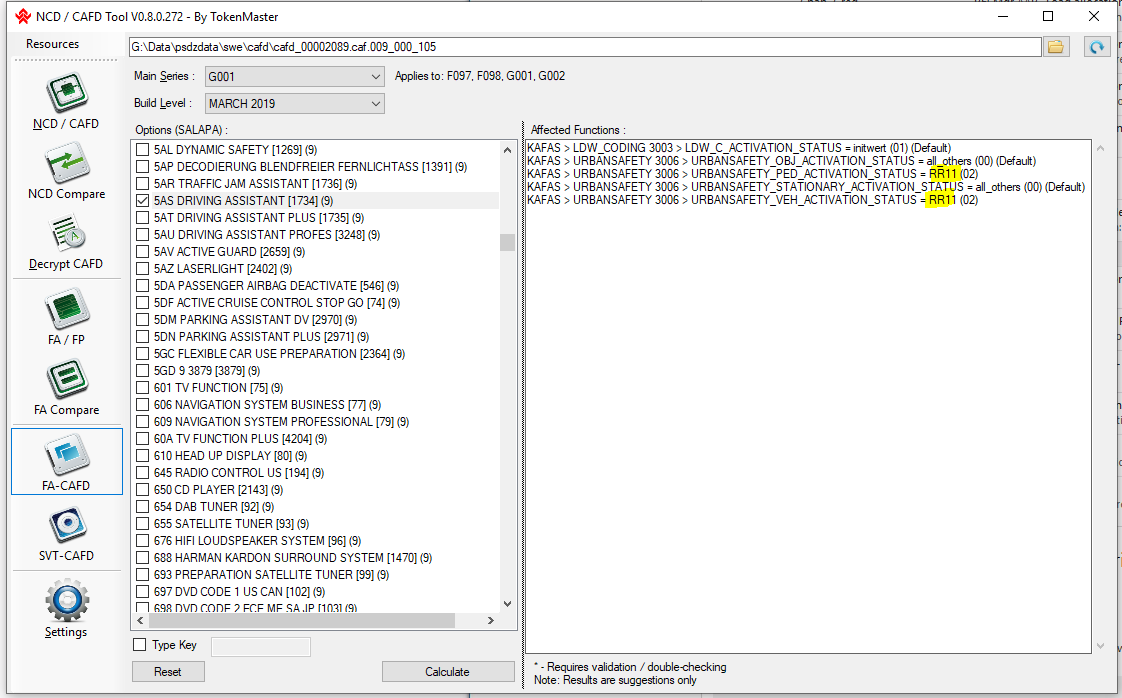
I just want to quickly bring it back to life, so I plugged in the components from Launcher PRO. It has so much dependencies on it, but it gave me the benefit of quickly analyzing the G-series stuff. So far, so good. I can see some minor issue with mapping though, but that's just given, the way we do things.
I can't wait to fully analyze the CAFs on this G01. Hopefully, I can enable and test some stuff soon, in preparation for my own car.
My friend has been asking what we can possibly change with his car, but hasn't asked for it back. I might keep it for another week or so. NO! I WILL keep it for another week or so 😂
UPDATE: 09/07/2019
There seem to be a lot of potential, but I just don't have enough time to test them. So far, here's what I did to this X3:
- Speed Limit Info (SLI) - Note: FSC is required. I opted for the Euro Style SLI, the while circle with red outline. This is what I have on my i3, but the new US default is just silly, with the word "Speed Limit" on top of the value in a white rounded rectangle. That's just plain silly. It's nice how the HUD turns red, and the dial have a red trailing line when you go over the limit.
- Auto Start/Stop Memory - I wonder why this isn't the default yet
- Tailgate/Lid Angle/Height Settings
- Tire Temperature - Default only shows pressure
- Auto Park Assist On
- Cross Traffic Alert - haven't tested yet.
By the way, I'm getting a BSM
Tuesday, August 13, 2019
Launcher PRO 3.5.1
Launcher PRO 3.5.1 Build 216 is now available.
Change Log
====================
3.5.1 Build 2.6.1
- Fixed: Opening Settings screen crashes Launcher
3.5.0 Build 252
- Fixed: Opening Settings screen crashes Launcher
3.5.0 Build 252
- Reduced and improved memory utilization
- Minor bug fixes
*Requires Google Authenticator mobile app. Download from Apple App Store or Google Play Store
Note: Please see https://www.fxxtokenmaster.com and blog before upgrading to 3.1+. Launcher PRO now uses Time-based One-time Password for authentication.
Google Authenticator is required when using dynamic activation and when updating the Launcher.
There's quite a bit of changes to this version, mainly, handling of JVM, less memory utilization and minimal use of temporary files. There's still tons of room for improvement.
I did test this on Win7 x86 FR, Win10 x86 TR, Win10 x64 RU and Win10 x64 EN, so hopefully, any compatibility issue is minimized.
Friday, June 21, 2019
Launcher PRO 3.4.2
Launcher PRO 3.4.2 Build 216 is now available.
Change Log
====================
- Improved CAFD processing and mapping, 200-300% gain typical
- Suppressed dialog G271
- Minor UI change - unified Launch and Abort button
- Fixed: Application launch failure on some system
- Minor bug fixes
-Fixed: Loading VO causes crash
I made a lot of changes for this build, I contemplated on labeling it 3.5. I made some major improvements on CAFD processing and mapping. On my 5th Gen Core i5, using 3.33.4 x64, fully processing HU NBT CAFD takes about 5 seconds, and BDC CAFD shows in under 8 seconds. This is a huge improvement over previous versions where it takes about 20+ seconds to process HU NBT.
I'd be doing further changes in the coming days.
I suppressed the G271 dialog as it's getting too annoying. I don't think anyone cares about what it says anyway.
I also made improvements on the web side. There was an incident where nobody can login, even myself. It was because the server time was way off. I had to do an emergency deployment and query Internet time to rectify the issue, so the web application doesn't rely on server time anymore.
I recommend everyone to upgrade to this build.
Monday, May 27, 2019
Launcher PRO 3.4.0
Launcher PRO 3.4.0 Build 191 is now available.
Change Log
====================
3.4.0 Build 191
- Added: Support for 3.33.4 64bit Only
- Updated: CAFD Mapping compatibility level: 18-04 i-Step
- Removed: Required root certificate
- Minor bug fixes
NOTE: Authenticode RSA certificate is no longer required, but installing RSA Certificate with "EB06BA22 6FB31CD3 787A2ABB 84E71D61 F1CEA5B9" thumbprint to the Trusted Root Certification Authorities store on current user is still recommended. This certificate can only be used for Authenticode purposes and cannot be used to create intermediate or subordinate, or end entities certificates.
To Install Certificate:
via Command prompt: LauncherPro3.exe installcert
via Windows: Right-click LauncherPro3.exe > Properties > Digital Signatures > Details > View Certificate > Install Certificate and install it under Trusted Root Certification Authorities store
To Delete Certificate:
via Command prompt: LauncherPro3.exe removecert
or use mmc.exe and Certificate Snap-in. See https://tokenmaster.blogspot.com/2019/05/code-signing-certificate.html
*Requires Google Authenticator mobile app. Download from Apple App Store or Google Play Store
Note: Please see https://www.fxxtokenmaster.com and blog before upgrading to 3.1+. Launcher PRO now uses Time-based One-time Password for authentication.
Google Authenticator is required when using dynamic activation and when updating the Launcher.
NOTE: For WIndows 7 users, if you're having problems with validation/activation, Windows is probably not using TLS 1.2 to communicate to my site. Check the following registry key, as shown in the image:

First thing to do is ensure all updates are installed. If you don't see TLS 1.2 key, create it, then create the Client key under it. The two DWORD values must exist and should contain data as shown in the image. Restart WIndows and try again
Sunday, May 12, 2019
Code Signing Certificate
Code Signing Certificate
The recent release of Launcher PRO 3.0, and the re-release Launcher 2.0 BFU_XODE edition, is digitally signed and conforms with Windows Authenticode. Why do I need it, or the better question is, why do you need it? Authenticode or digitally signing a file ensures that the file is exactly how I released it when it gets to end users. It ensures the integrity of a file.
This only works if the user actively checks it, though. I have been signing every releases, but it's only the last release where I actively check digital signatures.
I'm honestly surprised to learn that there's a good number of people who doesn't know what it is, how to check it, and what it is for. Along with those, there are also some people who casted doubt and hurled accusations as to what my real intentions were.
I find it both humorous and preposterous at the same time, that these people would even insinuate that I'm up to no good. I mean, I've been doing this for a while now, and starting something nefarious just doesn't make sense, and just not my style. They're trying to cast doubts, but really, they don't know a thing about digital signature.
Anyone can check for themselves. If you check the digital signature by right-clicking the executable:

First thing to check is where it says "This digital signature is OK". NOTE: This will say something else if the certificate is not trusted, even if the digital signature checks out.
If you click View Certificate, you'll see the following:

The intended purpose of the certificate is important. As you can see, it's sole purpose is limited to digital signature, nothing more, nothing less. It cannot be used for server identification, create or issue or sign another certificate, or server or client authentication, or encryption/decryption, or anything else for that matter.
In short, the certificate cannot be used for exploit such as Man in the Middle (MITM) Attack. It's just not possible. Besides, for MITM to succeed, you have to be really stupid and do several things before it even initiates. Things that Windows Defender or modern browsers will reject.
These talking heads just want to insinuate things, but don't know jack.But I'm glad, because it forces me to look for better alternatives.
The only reason I'm using a self-signed code signing certificate is that it costs a lot, $200-$400/year, with the Extended Validation costing twice as much. I'm not going to spend that much penny.
Having said that, I decided that installing the root certificate is now not required. I found a way to validate digital signatures without needing to trust the certificate first. Obvious drawback is that it's less accurate and slower, and not at par to the level of security I intended.
The installed certificate can be removed by following these instructions:
- Add The certificates Snap-In
- Delete a Certificate
Also, from the command line, type LauncherPro.exe -cert
The next version of Launcher PRO will incorporate this. The repacked Launcher 2.0 Build 162 already have it.
I hope I shed some light into this. And again, nefarious stuff are not my thing, matter of factly, it's the opposite. My Launchers don't load modified files, remember?
The recent release of Launcher PRO 3.0, and the re-release Launcher 2.0 BFU_XODE edition, is digitally signed and conforms with Windows Authenticode. Why do I need it, or the better question is, why do you need it? Authenticode or digitally signing a file ensures that the file is exactly how I released it when it gets to end users. It ensures the integrity of a file.
This only works if the user actively checks it, though. I have been signing every releases, but it's only the last release where I actively check digital signatures.
I'm honestly surprised to learn that there's a good number of people who doesn't know what it is, how to check it, and what it is for. Along with those, there are also some people who casted doubt and hurled accusations as to what my real intentions were.
I find it both humorous and preposterous at the same time, that these people would even insinuate that I'm up to no good. I mean, I've been doing this for a while now, and starting something nefarious just doesn't make sense, and just not my style. They're trying to cast doubts, but really, they don't know a thing about digital signature.
Anyone can check for themselves. If you check the digital signature by right-clicking the executable:

First thing to check is where it says "This digital signature is OK". NOTE: This will say something else if the certificate is not trusted, even if the digital signature checks out.
If you click View Certificate, you'll see the following:

The intended purpose of the certificate is important. As you can see, it's sole purpose is limited to digital signature, nothing more, nothing less. It cannot be used for server identification, create or issue or sign another certificate, or server or client authentication, or encryption/decryption, or anything else for that matter.
In short, the certificate cannot be used for exploit such as Man in the Middle (MITM) Attack. It's just not possible. Besides, for MITM to succeed, you have to be really stupid and do several things before it even initiates. Things that Windows Defender or modern browsers will reject.
These talking heads just want to insinuate things, but don't know jack.But I'm glad, because it forces me to look for better alternatives.
The only reason I'm using a self-signed code signing certificate is that it costs a lot, $200-$400/year, with the Extended Validation costing twice as much. I'm not going to spend that much penny.
Having said that, I decided that installing the root certificate is now not required. I found a way to validate digital signatures without needing to trust the certificate first. Obvious drawback is that it's less accurate and slower, and not at par to the level of security I intended.
The installed certificate can be removed by following these instructions:
- Add The certificates Snap-In
- Delete a Certificate
Also, from the command line, type LauncherPro.exe -cert
The next version of Launcher PRO will incorporate this. The repacked Launcher 2.0 Build 162 already have it.
I hope I shed some light into this. And again, nefarious stuff are not my thing, matter of factly, it's the opposite. My Launchers don't load modified files, remember?
Subscribe to:
Posts (Atom)