Tuesday, November 22, 2022

Launcher PRO 5.2.4

 Launcher PRO V5.2.4 Build 131 is now available

Change Log:

- Added support for E-Sys 22.10.02


Change Log for V5.2.2, 5.2.3:
- Added support for E-Sys 22.10.00

- Added Language-aware FA/Vehicle Profile options metadata

- Fixed: FP/Vehicle Profile extended ASCII character display issue

- Fixed: FP/Vehicle Profile EN category names

- Fixed: NCD/CAFD Tools GUI issues

- Minor mapping improvement

- Minor bug fixes

FA/Vehicle Profile option descriptions will be shown in selected language. This version also include fixes for several NCD/CAFD Tools GUI elements, including pane/panel splitter issue.


I'm planning on reworking the Launcher, targeting maintainability and performance. The last couple of versions are already quite speedy and stable, but I feel like I can push the envelope a bit further. vNext will be a major update and will boost performance by quite a bit. 


VNext will also implement a hybrid "static" activation. It's not going to be hardware-locked, but will not require internet connection after the first sign in. Of course, this will make the online services unavailable, as a natural consequence.


Other Thoughts

E-Sys 22.10.02 also supports Ubuntu, but without UI. I'm thinking this version could run in native MacOS as well, but I have not played with it yet. If I find the time, I will look at this. It might be a good idea to create a unified UI that will run under Windows, MacOS (Intel/M* chips) and Ubuntu x64 hardware. It's still an idea and very early stage at that. Let's see...

Wednesday, October 19, 2022

Launcher PRO 5.2.1

 Launcher PRO V5.2.1 Build 117 is now available

Change Log:

- Added support for E-Sys 22.06.01

- KIS/WissensBasis-Enriched Metadata (Initial Support - Connection window, SVT section in Coding)

- Minor bug fixes


Quite a bit of you have been requesting to add information from KIS/WissensBasis db. I have looked extensively in the past and I haven't given it any serious thought as it's mainly in German. No offence intended, it's just that my knowledge of the Deutsch language is next to zero/zilch. Anyway, a good friend has asked if I could add it last week and it's all I needed to get started again. As a result, I added initial support and I will look at adding further. Currently, it's only supported in 2 places:

1) Open Connection Window


Car series applicable to a given main series/BRV is provided by KIS db.

2) SVT section in the Coding module.

The added metadata is shown where applicable, and is again, provided by KIS db. 

I'll look at adding more metadata where applicable, and where it makes sense. I just wish there's an equivalent English translations, but I'll get what we I take.

EDIT: It was brought to my attention that the Launcher had issue reading BDC_BODY3/CAF 44ED. I made a change in the Launcher and it was confirmed the change fixed the issue. This fix is only available for 3.40.xx and 22.06.xx. I may retrofit it in older versions if there's any need.

I wish this issue was brought to me sooner. Anyway, it appears to be fixed and I'm glad it's resolved.


Enjoy!

Friday, October 7, 2022

Launcher PRO 5.2.0 and Website update

Launcher PRO 5.2.0 Build 108 is now available

Change Log:

- Added support for E-Sys 22.06

- Improved translation mapping speed

- Added Passwordless authentication using USB security key (FIDO2) in app and website

- Added option to send minimal error details

- Minor bug fixes


The list is short, but there's a ton of work put into it. Most of the changes are in the backend. It's a lot easier and more secure to sign in.


Launcher PRO is going Hardware-Locked!

Hardware-locked account that is, because, USB Security Keys are now supported in Launcher PRO and the website. Anyone who uses Yubikeys, SoloKeys, Thetis and the likes know how great these little devices are. With Launcher PRO 5.2, it goes wherever you go, as long as you have your security key with you!  

With security keys, you don't need a password. It's passwordless authentication, yet stronger and more secure than ever. FIDO2/webauthn authentication is now supported. Enroll your Security key and start signing in to Launcher PRO without having to enter your password. FIDO2 is an enterprise-level authentication method that is widely supported by the industry. 

Learn more about FIDO2


Setting up/enrolling a security key is easy. The steps are the same whether you do it from the website, or through the app. Just follow this simple steps


1) Sign in to the app or the website and go to your account
2) On the account page, click Add USB Security Key/Enroll Security Key button


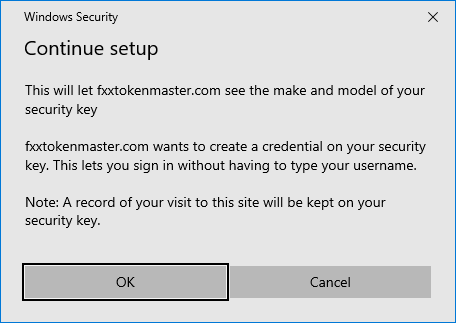
3) Windows will ask you to verify if you want to set up your security key. Click OK


4) Windows will again, ask you to confirm. Click OK. Windows will create the credentials and send the public key back to the website.


5) Windows will ask for your security key PIN. Enter your PIN and click OK


6) Finish the setup by touching your security key


That's it. You can now sign in with your security key.

To Sign in using your security key, follow these simple steps
1) Enter your email address. Better yet, let the website or Launcher PRO remember your email address. This will stay on your machine.

2) Click Sign in with Security Key


3) Windows will ask you to confirm you want to sign in


4) Touch your security key and you're all set. No password will ever be sent over the wire!

5) If you don't act within 30 seconds, the request will fail and you will have to start again.


Saturday, August 13, 2022

FxxTokenMaster.com Redesigned

 I spent most of last week redesigning my website. A few of you were getting frustrated seeing your activation requests not matching the PC you were using. The thing is, V5.0 do not care about it. The old site was written for V3.0, which has hardware-locked activation. V5.0 do not care about any that. It's using a different model and this is starting to get harder to explain by the day. A redesign is the only way.


So, here it is. Out is the old and aging V3 website, in is the new website for V5.0. 

I like dark mode a lot. It's in the Launcher PRO, thinking adding it as an option for the app, and now, the website is in full dark mode.


A bit minimalist, but that's all that's needed. It showcases the Launcher a little, with it's small and incomplete feature list...


What you won't see is the list of activation requests. It's just not needed anymore.


The website allows resetting forgotten password now. A long overdue feature. I don't know what I was thinking why it wasn't there from the get go.

Please check it out: https://fxxtokenmaster.com/


I can now focus back on the Launcher. It does require a bit more work

Sunday, July 17, 2022

Launcher PRO V5.1.0

 Launcher PRO V5.1.0 Build 90 is now available

Change Log:


Launcher PRO V5.0 hits a new milestone. This release entails a major revision, mostly in the underlying operations and inner workings of the Launcher. There are still so much to do, but a few of the big ones has made it to this release. I focused on compatibility on this one and eradicated some of the most niggling and persisting ones.


User Interface:

With this release, there's hardly any reason to visit the site. I have to add that the site need a long overdue update, but because of V3.0, I still need to keep it. There are a few options I'm considering but my focus is on the Launcher for now. Please ignore the very outdated content of the website, I will update it when the time comes.


QR code can now be seen from the Launcher's Account page. This doesn't require any Google API, so it should work on region where Google services are blocked. The QR code can be used in any standard TOTP generator like Microsoft, Authy...etc., not just Google Authenticator. I know it says Google Authenticator is required, but really, it isn't.


I realized that the previous FP (Vehicle Profile) Viewer was just awful. There's no reason for it to be in a treeview. I replaced it with a much nicer view, utilizing the UI elements I made for the FA/SVT-CAFD FDL calculators. Minor change but big impact.


Under the Hood:

I spent a great deal of time dealing with compatibility issue. I focused on leaving areas untouched if they don't need to be, ran a fine tooth comb through the source and identified where code needs to be injected, only where/when necessary. There's a significant boost in performance, compatibility and stability. I found new methods that are simply superior. These resulted in having to rewrite new codes, and eliminate most of the old ones. In a lot of ways, this is, yet again, all new. There's very little left of what was in the original 5.0 code base. It was intense, but highly rewarding. The result is V5.1

I highly encourage you to check this build out.


Lastly...

I can't stop everyone from asking via the comment section, so might as well, include some info here. If you want to know more about the Launcher V5.0, send me an email at fxxtokenmaster@gmail.com.  

Tuesday, July 5, 2022

NCD/CAFD Tool Link down forever

 So some weird random guy appears to be claiming a copyright to my original work. Unfortunately, Mega listened to the poser.

Mega took down the link. Probably better off this way, anyway. The integrated tool is so much better


Anybody know who the heck this guy is?

Monday, July 4, 2022

Launcher PRO V5.0.7

 Launcher PRO V5.0.7 is now available


Change log

- Added FP/Vehicle Profile viewer (3.36+ only)
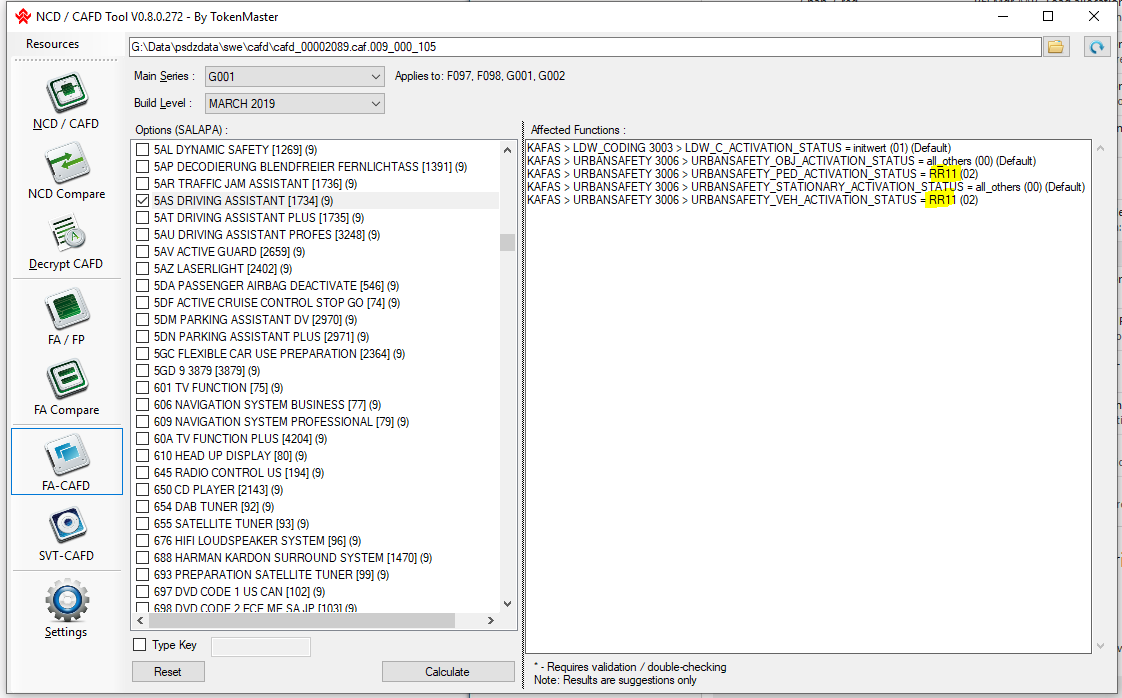
- Added FA-NCD/CAFD FDL Calculator for Coding 1/2 CAFs (3.36+ only)
- Added SVT-CAF FDL Calculator for Coding 1/2 CAFs (3.36+ only)
- Improved Mapping calculation speed
- Minor bug fixes


Added Features:

Another substantial release. I've been very busy adding these features in Launcher PRO. I like how they turned out. I've almost forgotten how nice these features are. Luckily, somebody reminded me.

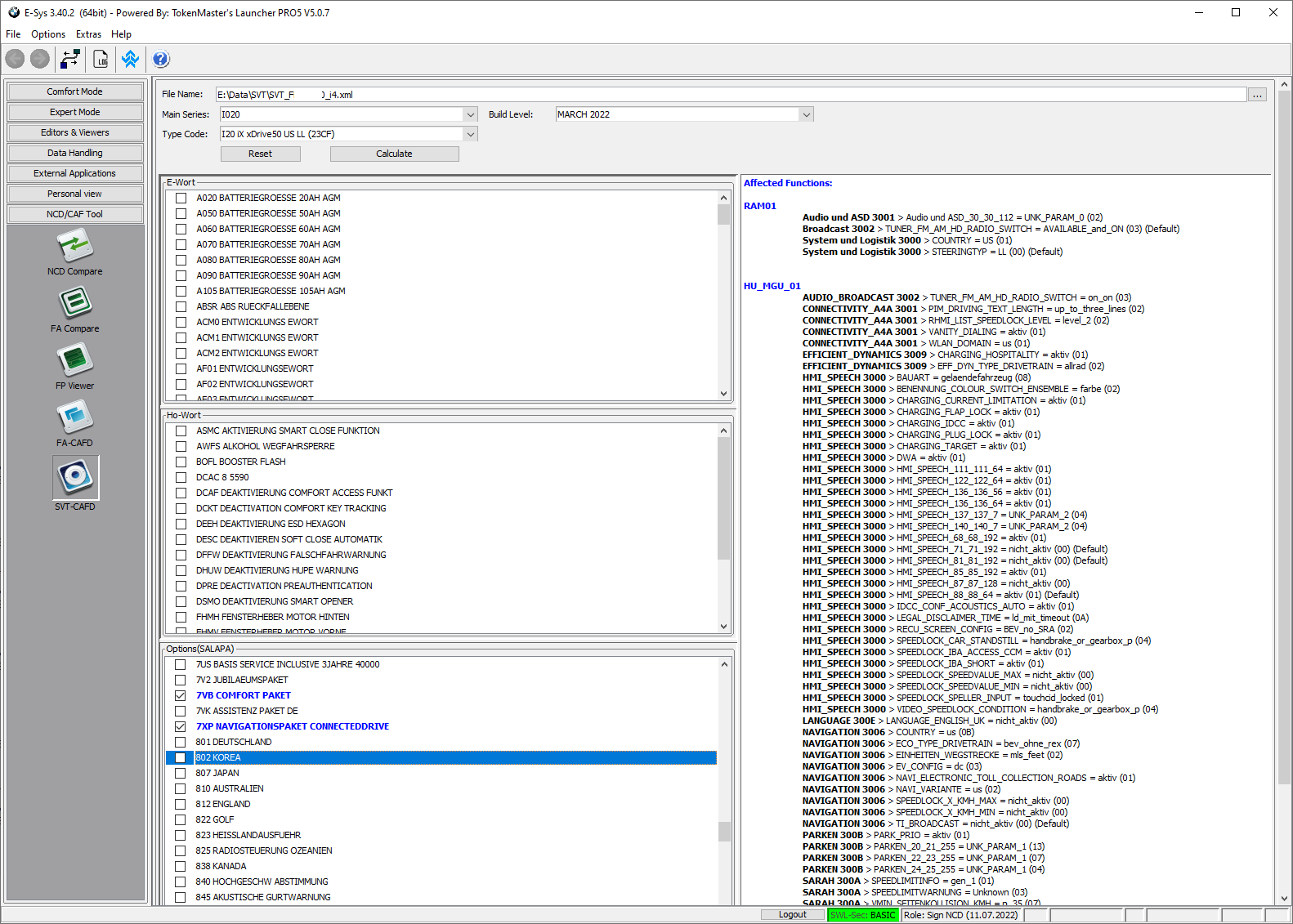
The following screenshot shows the SVT-CAF FDL calculator. These are the "What-IFs" feature from the old NCD/CAFD Tool, integrated into Launcher PRO.


Not really useful feature, but I hate how small the button icons are. I increased the size a bit and added transparency, more to my liking. This is only implemented in the NCD/CAF Tool. I left the others as they are.

Hope you enjoy these new features as much as I enjoyed writing them. Let me know what you think.

Tuesday, June 7, 2022

Launcher PRO V5.0.6

Launcher PRO V5.0.5 is now available

Launcher PRO V5.0.6 is now available


Change log


Supported Apps


New Feature: NCD/CAF Comparison Tool

Another substantial release, this time, with integrated NCD/CAF Tool, well, at least partially. The more important feature of the old NCD/CAFD Tool, the NCD/CAF Compare and FA/FP Compare tool has been integrated into the app. This took lots of time, but I did enjoy making it, so it's well worth it.


NCD Comparison tool supports both Coding 1.0 and 2.0 format and can be used to compare against default values, or against another NCD from the same ECU. I use this feature often, and lot of people reminded me how useful it is for them, I actually like this more than the original NCD comparison tool.


New Feature: FA Comparison Tool


FA tool will read an existing FA file, and the vehicle profile (FP) will be recalculated. Simple comparison tool.

I'm planning to add more, as time permits. I hope these new features somehow help in making your cars more personal and more enjoyable.


Others

This build monitors the launch process and will recover if it detects launch failure. When it detects launch failure, it will terminate the process and notify you, giving you a chance to try again. When it does, restart the app before trying again. Not sure yet what is causing it to get stuck, but I've seen it happen with or without optimization, with or without the launcher. 


EDIT

I just noticed that this build asks for password every time it is started. It's not supposed to do that. I'll look into it and likely come up with a quick update

Saturday, May 28, 2022

Launcher PRO V5.0.4

 Launcher PRO V5.0.4 is now available


I've realized I haven't mentioned about localization that was added in the Launcher since V5.0.1. I thought now is a good time to mention this. I've added a basic localization via json file. Sample output below (and pardon me, my German is pretty bad)


I'd love to see the Launcher localized and please, help if you can. This can be done by creating a json resource file. Format of the file is Resources.<ISO_language_country>,json. The 2-letter ISO language and country should match the PC's locale. The json file will have to be in %LocalAppData%\LauncherPRO5.


Sample Resources.de-DE.json

{
  "L18N": {
    "GoBackButton": "Geh Zurück",
    "AppLaunchingTitle": "Starten ",
    "LaunchPadTitle": "Startrampe",
    "SettingsTitle": "Einstellungen",
    "LoginTitle": "Konto",
    "CheckUpdateTitle": "Aktualisierung überprüfen",
    "FdlCodesTitle": "FDL Cheat Codes",
    "KisDbTitle": "KIS Wissensbasis",
    "CancelButton": "Absagen",
    "OKButton": "OK",
    "SaveButton": "Speichern",
    "SignInButton": "Einloggen",
    "SignOutButton": "Abmelden",
    "SearchButton": "Suche",
    "CheckUpdateButton": "Auf Updates prüfen",
    "ToggleSelectButton": "Auswahl umschalten",
    "UpdateFdlButton": "Download/Update",
    "UserIdLabel": "Nutzername :",
    "PasswordLabel": "PIN or Passwort :",
    "AppEntryTitle": "Application Entry",
    "AppEntryNameLabel": "Name :",
    "AppEntryPathLabel": "Weg :",
    "MemoryLabel": "Speicher",
    "OptionsLabel": "Optionen",
    "ThemeLabel": "Thema",
    "LoginFailed": "Fehler bei der Anmeldung"
  }
}


Update: My friends from Korea went to town with customization. I was sent this. This is awesome!


Saturday, May 14, 2022

Launcher PRO 5.0.3

 Launcher PRO V5.0.3 is now available


Change Log:

- Added supported app: 3.81, 3.39.0, 3.39.1, 3.40.0

- Fixed bugs with localized Windows 11 x64 (RU, DE, NL...etc.)

- Fixed FA/FP mapping

- Fixed NCD Preparation and Online Signing for 3.38+

- Fixed URL handling in Change Logs page

- Minor bug fixes


A bit of a huge update for Launcher PRO V5.0. I thought the fix for Windows 10 Euro versions fixes Windows 11 as well. but I was wrong. A bit of a pain to setup Windows in languages foreign to me, but it turned out great in the end. I now have several testing environment.


Another thing that proved very challenging is making V3.39 and V3.40 work with the Launcher.  There's not much technical issue with the app itself, but it has a lot to do with the use of OpenJDK 11. Anyway, glad to have this behind me. Spent a few days trying to figure it out.


V5.0.2 can't handle links in this page, so please, get the links from the website


List of supported apps. I'm skipping 3.37 altogether. I think 3.36 and 3.38 are great builds. I am not too sure with 3.39 and 3.40, but that's just me. 

Sunday, May 8, 2022

Launcher PRO 5.0.2

Launcher PRO V5.0.2 is now available


Change Log:

- Fixed bugs with localized Windows (RU, DE, NL...etc.)


If you have turned on Check Update option, Launcher PRO will alert you of critical updates, such as this 


Note: Avoid posting support-related questions in the comments section. I don't actively watch comments and don't want to miss anything important. Please send me an email


Important: Apparently, Launcher PRO doesn't handle the link properly. This will be fixed in the next build. Please grab the link from my website for now

Wednesday, May 4, 2022

Launcher PRO 5.0.1

 Launcher PRO 5.0.1 Build 36 is now available

Launcher PRO V5.0.1 is rewritten from the ground up for Windows 10, 11 64bit only on bare metal machine, meaning, no virtual machines. Supported Versions are 3.35.0, 3.36.0, 3.36.1, 3.36.2, 3.38.2 64bit only, with more to come.

Version 5.0 supports both CAFD versions 1.0 and 2.0. Slowly, but eventually, BMW is moving to online signing all coding data, starting with Coding 2.0 (SP2021), and now Coding 3.0. Signature methods for these CAFD uses RSA 2048 to RSA 4096 and Elliptic curves (ECCP 256 – ECCP 521. These will be very limiting in the future. As of the latest PSdZ data, Launcher PRO V5 supports online signing of known CAFD using authenticated keys and proper coding proof stamp. I'm probably letting off more than I should, but we'll get there eventually.

Launcher PRO V5.0 sports streamlined modern Metro UI. There are 5 selectable themes to choose from. Add as many supported apps as possible and double-click when ready to run.


Launcher PRO V5.0 makes Google Authenticator optional, but is very convenient, so might as well use it. All Time-based One-time Password generator Authenticator, i.e., Microsoft Authenticator, are supported, not just Google Authenticator. More importantly, no more PC activation. Launcher PRO V5.0 is no longer tied to a particular PC. Use anywhere, anytime. It's just like the old dynamic activation, but unlimited.


Launcher PRO V5.0 departs from its predecessor in handling KIS database. It's now an Opt-in model where you have to choose which KIS is loaded, as opposed to Opt-out model used in the old version. At least one KIS must be selected


Settings can be temporary or can be applied every time. Either way, you have total control


FAQ:
Q: Can I install on 3 PCs?
A: Yes. There's actually no limit on the number of PCs, so if you have 5 PCs, go ahead and install it on all 5 PCs. The only limitation is that only 2 PCs are active at any given time, so if you move to the 3rd or so PC, you just need to authenticate again.

Q: How long is the license?
A: 3 years is the standard length of the license with no PC limitation

Q: My account says I activated 2 PCs and cannot activate anymore
A: Ignore the website. It was built for V3.0 and I can't update it until V3.0 dies. It will only show the first 2 codes, but really, it is meaningless for V5.0. There is no static or dynamic activation in V5.0

Q: Can I activate more than 1 PC?
A: Err, I just said, there is no static, nor dynamic activation in V5.0 :)

Q: I have a V3.0 license, can I use V5.0?
A: Updates are free, and V5.0 is and upgrade to to V3.0, so yes, you can.

Q: What happens to my V3.0 license?
A: Nothing. It will be as is. If you get a new license now, you will have an extended license. So if you have a year left on the old one, you will end up with 4 years, total.


If you still have active key/s, head out to https://www.fxxtokenmaster.com and grab Launcher PRO V5.0

Sunday, June 28, 2020

CAF/NCD 2.0

Starting with V3.34.0, Online signing has been implemented. I did change this to offline/On-premise signing, but I think it's no use to keep reverting to offline signing. I've been working on V3.35(V3.35.1) and V3.36 (V3.36.1, V3.36.2) and have these versions working, but I really do want to support Coding 2.0. This is the future and where we're all going. This means new format of everything and will make everything as we know it today, obsolete. This includes the current mapping technology, and even the NCDF/CAFD Tool.

I've been contemplating releasing an update and retrofit support for Coding 2.0, but my desire to support it and do it right the first time prevailed.

I've checked the latest PSdZdata and we do have a few CAFD 2.0, but seems to be faulty. I can generate NCD 2.0, but I wanted a factory one. So, I'm looking for NCD and CAFD 2.0. These are found in newer G20, G08, i4...etc. If anyone has them, I'd appreciate a couple of samples, better yet, the entire set, including FA.

This is really a big change, so bear with me as we tread this uncharted waters together. I'd be devoting time to this in the following weeks or months even.

Saturday, December 7, 2019

Launcher PRO 3.7.0 and Website Update

Launcher PRO 3.7.0 Build 315 is now available.


Change Log
====================
3.7.0 Build 315
- Huge improvement in CAFD processing (BDC, NBT and MGU in the low 2s)
- Better, more accurate CAF mapping and translation
- Significant reduction in memory usage
- Improved 32-bit app performance and stability
- Better handling of low memory condition in 32-bit app
- Fixed: Bug in JNI component that was introduced in V3.2+
- Minor bug fixes

*Requires Google Authenticator mobile app. Download from Apple App Store or Google Play Store

Note: Please see https://www.fxxtokenmaster.com and blog before upgrading to 3.1+. Launcher PRO now uses Time-based One-time Password for authentication. 
Google Authenticator is required when using dynamic activation and when updating the Launcher.


This is a must-have update. It's more stable all around. 32-bit app has been causing low-memory condition, resulting anywhere from failed mapping to app crash. I put extensive work on this build to significantly reduce memory usage, improve stability and enhanced the performance of the mapping module. The following image shows the timing when opening HU NBT and BDC_BODY CAF.


Like the new graphic, I'd like to call this the Concept 4 Edition. Like the Concept 4, the Launcher is just leaner, meaner and faster all around.

To fully appreciate the improvements, use the 64-bit versions. It's just way so much better. When using 32-bit versions, expect the Launcher to fallback to slower method most of the time due to memory constraint. It's no slouch at all, but it's nowhere near the performance it can achieve when using 64-bit versions.


Website Update

My web host has been doing changes to their infrastructure, causing unintended side-effect on my app. I noticed a couple of days ago that validation has been failing, and upon further investigation, found that my web host did drastic settings changes which caused a critical function of my web app to fail. I scrambled to find a solution and worked around this changes, since they won't acquiesce to reverting the changes. Anyway, I'm glad to announce that I rewrote the affected portion of my website, so login/validation is working again. 

If you have been experiencing problems recently when trying to login/activate, please try again and let me know if the issue persist.


**Don't use the comment section to ask where to get it and stop posting your email addresses

Tuesday, November 12, 2019

FXXTokenMaster.com is UP

My Web host is DOWN for 3 days now. 


All customers are not privy to what is happening and we're being kept in the dark. Sorry for the inconvenience and I appreciate your patience. I'm hoping to get my site back up and running, sooner than later.


My site is now up, at least for the moment. My host drop the ball big time and all files were replaced with a very old version. I just can't wait any longer and blasted the entire site with files that I know are working.
I'll have to check what else has changed and act accordingly, so, it may go down from time to time.
I apologize for any inconvenience.

Sunday, November 3, 2019

Launcher PRO 3.6.0

Launcher PRO 3.6.0 Build 288 is now available.


Change Log
====================
3.6.0 Build 288
- Added: Support for 3.34 64bit Only
- Improved PSdZ Handling and Translation
- Minor bug fixes

*Requires Google Authenticator mobile app. Download from Apple App Store or Google Play Store

Note: Please see https://www.fxxtokenmaster.com and blog before upgrading to 3.1+. Launcher PRO now uses Time-based One-time Password for authentication. 
Google Authenticator is required when using dynamic activation and when updating the Launcher.


V3.34 is really interesting, but appears to be an indication of how things are, going forward. The easier way to deal with it would have been to provide an alternate REST API for signing and encrypting NCD, but I don't believe in encrypting user's data.  It's my NCD, I'd like to not be locked out of it, so I chose the harder way. NCD files remain not encrypted. Properly signed, but not encrypted.

It appears to be well-coded and stable. I like this version a lot.


**Don't use the comment section to ask where to get it and stop posting your email addresses

Tuesday, August 27, 2019

X3!!!

I've been playing with a friend's G01 XDrive these couple of days, (well, it's been more than a week, but who's counting?). No serious coding yet, just taking a look-see at what can be done with it.

G01 is really nice. It's small enough to replace a sedan, but not big enough to compete with a family SUV. I like it, so much so, that it gave me enough motivation to go and shop around, and shop around I did. I've looked and test drove a couple of G20s. I like the G20, so much technology squeezed into that little car. However, I'm still more impressed with the G01, even with its older technology. I know it will have the Live Cockpit Pro and ID7 in the coming builds, so G01 will have all the same bells and whistles that the G20 has.

Did I say I like the G01? YES, I like it. I like it so much that a new G01 will be coming home with me soon :(  Just deciding between BSM, Alpine White, Mineral White. Leaning towards BSM, like my F30. I wish I can turn off XDrive. I mean, in my suburban settings, I hardly have the need for it but I want it, in case I need it.

I can hear a voice screaming inside my head: "Ahhhh, noooooo, wait for a couple of months and you'll have all the good stuff the G20 has!!!!!". F*ck my EQ,  I wanna drive it NOW!!! Giving up the i3 for it. I think I'm OK with that trade. That thing depreciates like crazy, though.

I detailed my F30 last weekend, to help me contain my excitement. She still runs like a champ, and she aged gracefully. After getting in a G20 though, it does feel really old.


And you know what else it motivated me to do? Dusted off NCD/CAFD Tool. The tool is so outdated that I see a lot of inaccuracies, and the "What-If"s functions are really crawling. Of course, the format of NCD and CAF files have changed a little bit too, and so are the rules for functions.


I just want to quickly bring it back to life, so I plugged in the components from Launcher PRO. It has so much dependencies on it, but it gave me the benefit of quickly analyzing the G-series stuff. So far, so good. I can see some minor issue with mapping though, but that's just given, the way we do things.

I can't wait to fully analyze the CAFs on this G01. Hopefully, I can enable and test some stuff soon, in preparation for my own car.

My friend has been asking what we can possibly change with his car, but hasn't asked for it back. I might keep it for another week or so. NO! I WILL keep it for another week or so  😂


UPDATE: 09/07/2019
There seem to be a lot of potential, but I just don't have enough time to test them. So far, here's what I did to this X3:

  • Speed Limit Info (SLI) - Note: FSC is required. I opted for the Euro Style SLI, the while circle with red outline. This is what I have on my i3, but the new US default is just silly, with the word "Speed Limit" on top of the value in a white rounded rectangle. That's just plain silly. It's nice how the HUD turns red, and the dial have a red trailing line when you go over the limit.
  • Auto Start/Stop Memory - I wonder why this isn't the default yet
  • Tailgate/Lid Angle/Height Settings
  • Tire Temperature - Default only shows pressure
  • Auto Park Assist On
  • Cross Traffic Alert - haven't tested yet.

By the way, I'm getting a BSM

Tuesday, August 13, 2019

Launcher PRO 3.5.1

Launcher PRO 3.5.1 Build 216 is now available.


Change Log
====================
3.5.1 Build 2.6.1
- Fixed: Opening Settings screen crashes Launcher

3.5.0 Build 252
- Reduced and improved memory utilization
- Minor bug fixes

*Requires Google Authenticator mobile app. Download from Apple App Store or Google Play Store

Note: Please see https://www.fxxtokenmaster.com and blog before upgrading to 3.1+. Launcher PRO now uses Time-based One-time Password for authentication. 
Google Authenticator is required when using dynamic activation and when updating the Launcher.


There's quite a bit of changes to this version, mainly, handling of JVM, less memory utilization and minimal use of temporary files. There's still tons of room for improvement.

I did test this on Win7 x86 FR, Win10 x86 TR, Win10 x64 RU and Win10 x64 EN, so hopefully, any compatibility issue is minimized.

Friday, June 21, 2019

Launcher PRO 3.4.2

Launcher PRO 3.4.2 Build 216 is now available.


Change Log
====================

- Improved CAFD processing and mapping, 200-300% gain typical
- Suppressed dialog G271
- Minor UI change - unified Launch and Abort button
- Fixed: Application launch failure on some system
- Minor bug fixes
-Fixed: Loading VO causes crash

I made a lot of changes for this build, I contemplated on labeling it 3.5. I made some major improvements on CAFD processing and mapping. On my 5th Gen Core i5, using 3.33.4 x64, fully processing HU NBT CAFD takes about 5 seconds, and BDC CAFD shows in under 8 seconds. This is a huge improvement over previous versions where it takes about 20+ seconds to process HU NBT.

I'd be doing further changes in the coming days.

I suppressed the G271 dialog as it's getting too annoying. I don't think anyone cares about what it says anyway.

I also made improvements on the web side. There was an incident where nobody can login, even myself. It was because the server time was  way off. I had to do an emergency deployment and query Internet time to rectify the issue, so the web application doesn't rely on server time anymore.

I recommend everyone to upgrade to this build.